
Quick answer: how does the Tiranga wallet work?
The Tiranga Wallet screen shows your Total balance split into the Main wallet and the 3rd party wallet, with buttons for Main wallet transfer, Deposit, Withdraw, Deposit history and Withdrawal history. Money you deposit lands in the Main wallet. When you play some provider games, part of the balance moves to a 3rd party wallet; Main wallet transfer brings it back so you can withdraw it.
Definition
What is the Tiranga wallet?
The Tiranga wallet is the rupee balance area of your account where deposits arrive, game balances are tracked and withdrawals start.
On the Wallet screen we captured, the top showed the Total balance, with two dials underneath: Main wallet (₹7.80 at 100% in our test account) and 3rd party wallet. Below them sat a Main wallet transfer button and four shortcuts: Deposit, Withdraw, Deposit history and Withdrawal history. Further down, the screen listed game wallets such as ARGame and Lottery with their own balances.
Think of the Main wallet as your home account and the 3rd party wallets as balances held inside specific game providers while you play there.
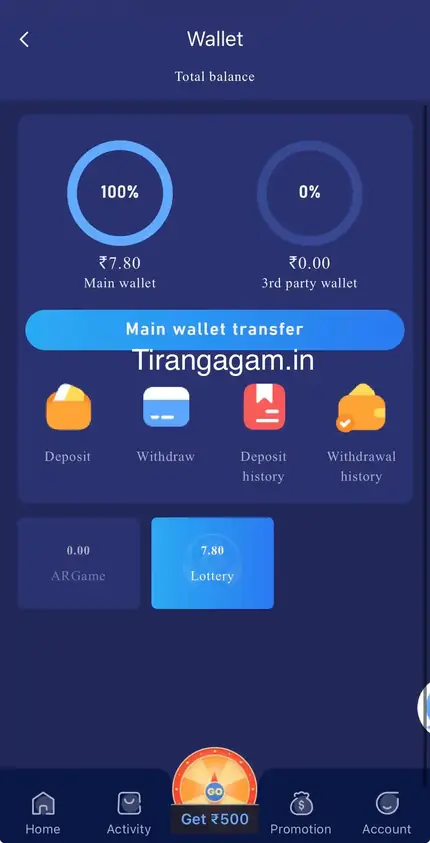
Screen guide
What does each part of the Tiranga Wallet screen mean?
| Item | Meaning | When you use it |
|---|---|---|
| Total balance | Main wallet plus 3rd party balances | Quick check of everything you hold |
| Main wallet | Balance held directly in your Tiranga account | Deposits arrive here; withdrawals leave from here |
| 3rd party wallet | Balance sitting in provider games (slots, casino, etc.) | After playing provider games |
| Main wallet transfer | Pulls 3rd party balances back to Main | Before withdrawing or switching games |
| Deposit / Withdraw | Add or take out money | See the deposit and withdrawal guides |
| Deposit history / Withdrawal history | Status of every transaction | To track pending payments |
Step by step
How do I move money back to the Tiranga Main wallet?
Open Wallet and tap Main wallet transfer; the balances in 3rd party wallets move back to the Main wallet.
- Leave the game. Close any slot or casino game you have open.
- Open Wallet. From Account or the wallet icon.
- Tap Main wallet transfer. Wait a few seconds for the balances to refresh.
- Check the dials. The Main wallet should now show most or all of the Total balance.
If the transfer does not change anything, wait a minute and try again after fully closing the provider game. If money still seems missing, raise a ticket through the Tiranga Self Service Center.
Tracking
How do I read Tiranga deposit and withdrawal history?
Each record shows the amount, time, method and a status such as pending, success or failed; keep the order number for support.
- Pending deposit: the payment is being matched. Do not pay again; follow Tiranga deposit not received if it stays pending.
- Successful deposit: the amount is in your Main wallet.
- Pending withdrawal: the request is being processed; see Tiranga withdrawal problem if it takes too long.
- Failed or rejected: usually wrong bank or UPI details, or unmet rules; the money normally returns to the wallet.
Fixes
Why does my Tiranga balance look lower than expected?
- Part of it is in a 3rd party wallet: tap Main wallet transfer.
- A deposit is still pending: check Deposit history.
- A withdrawal is in progress: the amount is held while it is processed.
- Bonus money may have turnover rules before it can be withdrawn; read the reward’s Game Rules.
To see how the wallet fits into the rest of the platform, visit the Tiranga Game wallet and games overview.
Good habits
How should I manage money in the Tiranga wallet?
- Keep only your planned playing budget in the wallet; withdraw the rest to your own bank or UPI.
- Tap Main wallet transfer after every slot or casino session so you always see your real balance.
- Screenshot deposit confirmations and keep UTR numbers until the history shows success.
- Check history weekly to see how much you have deposited and withdrawn overall.
A weekly look at total deposits against total withdrawals is the simplest honest measure of whether playing still fits your budget.
FAQ
Tiranga wallet FAQ
What is the 3rd party wallet on Tiranga?
It holds the balance you have moved into games run by outside providers, such as slots and live casino. Use Main wallet transfer to bring it back.
Can I withdraw from the 3rd party wallet directly?
Withdrawals start from the Main wallet, so transfer the balance back first.
Where do Tiranga deposits go?
Successful deposits are credited to the Main wallet.
Why is my Tiranga Total balance different from Main wallet?
Total balance includes 3rd party wallets. The difference is money still inside provider games.
Is my Tiranga wallet money insured?
Treat it as money at risk. Only keep what you plan to play with and withdraw the rest to your own bank or UPI.
How do I see old Tiranga transactions?
Open Deposit history or Withdrawal history on the Wallet screen.
Summary
Key takeaways
- Total balance = Main wallet + 3rd party wallets.
- Deposits arrive in and withdrawals leave from the Main wallet.
- Main wallet transfer brings provider balances back.
- Use the two history screens to track every payment.