
Quick answer: what do I do if my Tiranga deposit is not received?
Do not pay again. Open Wallet → Deposit history to check the order, find the UTR (reference) number in your UPI app, then open the Self Service Center, choose Deposit Not Received and submit the form with the UTR and a payment screenshot. The Self Service tips said requests are handled within about 10 minutes; after 15 minutes you can check the result with Progress Query.
Causes
Why is my Tiranga deposit not showing in my wallet?
A deposit is usually delayed because the payment could not be matched to your order automatically.
| Cause | What happened | What to do |
|---|---|---|
| Different amount | You paid a different sum from the order | Submit Deposit Not Received with proof |
| Order cancelled | You pressed back or cancel after paying | Submit with the UTR and screenshot |
| Timer expired | You paid after the order time ran out | Submit with proof; do not pay the new order |
| Bank delay | The UPI network is slow | Wait 10–15 minutes and recheck history |
| Paid to wrong ID | You paid a UPI ID from a chat message | Contact your bank; this is likely a scam |
First checks
What should I check before raising a Tiranga deposit ticket?
- Your bank or UPI app: did the money actually leave, and does the transaction show “success”?
- The UTR number: a 12-digit reference in the UPI transaction details.
- Deposit history: find the order with the same amount and time.
- The Main wallet: refresh it; see the Tiranga wallet guide if money looks split between wallets.
If your UPI app shows the payment as failed or pending, the money has not reached the platform yet. Most banks auto-reverse failed UPI payments; ask your bank if it does not return.
Step by step
How do I submit Deposit Not Received on Tiranga?
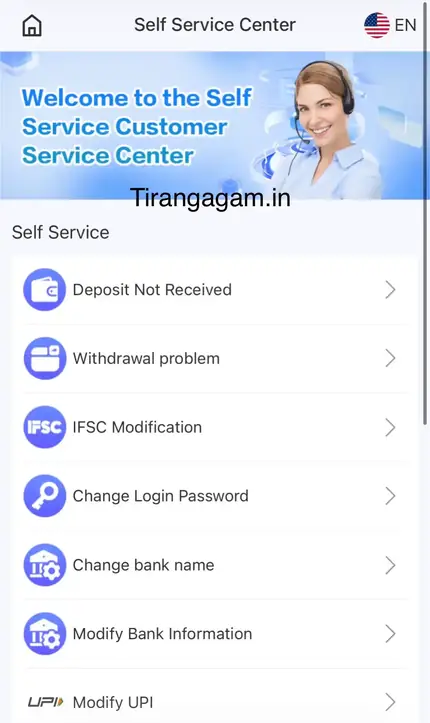
Use the Self Service Center so the request goes straight to the deposit team with your proof.
- Copy the UTR. Open the transaction in your UPI app and copy the reference number.
- Screenshot the payment. Include amount, date, time and UTR.
- Open the Self Service Center. From the menu or 24/7 Customer service.
- Tap Deposit Not Received. It is the first option on the list.
- Fill in the form. Order number, amount, UTR and upload the screenshot.
- Submit and wait. The tips said about 10 minutes for handling.
- Use Progress Query. After 15 minutes, check the review result.
Avoid
What should I avoid while a Tiranga deposit is pending?
- Do not pay the same order twice. Two payments make the case harder to solve.
- Do not submit many tickets. One ticket with full proof is faster.
- Do not trust “recovery agents” on Telegram or WhatsApp who ask for a fee or your OTP.
- Do not share your UPI PIN with anyone, ever.
Deposit steps that avoid these problems are in the Tiranga Game deposit guide. The wider Tiranga Game help centre links every topic.
Escalate
What if the Tiranga deposit is still missing after the ticket?
Read the Progress Query result, then follow up through Online service with the ticket details if it is still unresolved.
If Progress Query shows the ticket was rejected, the reason is usually a missing or unclear UTR, a cropped screenshot or a mismatch in amount. Resubmit once with clearer proof. For longer delays, open Online service from the Self Service Center and share the order number. More on the support tools is in the Tiranga customer service guide.
Writing the ticket
What should I write in a Tiranga Deposit Not Received ticket?
A short, complete ticket gets resolved faster than a long complaint.
Include the order number from Deposit history, the exact amount, the date and time, the payment app you used and the 12-digit UTR. Attach one clear screenshot of the success screen in your UPI app, uncropped so the UTR, amount and time are visible. A single line such as “Paid ₹500 by UPI at 14:05, UTR 1234…, not credited” is enough. Do not include your UPI PIN, OTP or password anywhere; support never needs them.
FAQ
Tiranga deposit not received FAQ
How long should I wait before reporting a Tiranga deposit?
If your UPI app shows success but the wallet has not updated after about 10–15 minutes, submit Deposit Not Received.
Where do I find the UTR number?
Open the transaction in your UPI app (PhonePe, Paytm, Google Pay or your bank app). The UTR or UPI reference is a 12-digit number.
Should I pay again if the deposit is pending?
No. Paying again does not speed things up and can create a second problem.
I paid the wrong amount. Will I get it?
Submit Deposit Not Received with proof. Note that the recharge instructions warn the platform is not responsible for wrong-amount transfers.
Is a Tiranga deposit refund possible?
The usual outcome is crediting the wallet once the payment is matched. Ask customer service about your specific case.
What does Progress Query show?
It shows the review result of the work order you submitted, such as processed or rejected.
Summary
Key takeaways
- Never pay twice for a missing deposit.
- Collect the UTR and a full payment screenshot.
- Submit Deposit Not Received in the Self Service Center.
- Check Progress Query after about 15 minutes.
- Ignore paid “recovery agents”.