
Quick answer: why can’t I complete Tiranga login?
Tiranga login usually fails because of the wrong tab (phone vs email), a typo in the number or password, an old autofilled password, an expired session, a weak connection or a fake login page. Check each of these in order. If nothing works, use Forgot password? or the Self Service Center rather than creating a second account.
Basics
What is Tiranga login and what do I need?
Tiranga login is the sign-in step that connects you to your Tiranga account, wallet and history using your +91 phone number (or email) and password.
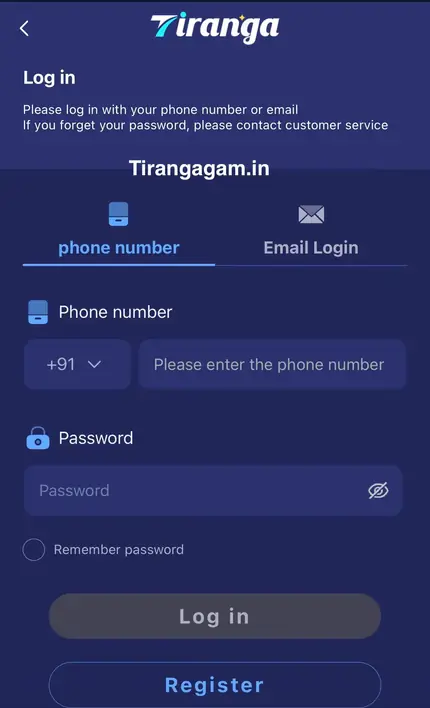
You need three things: the exact phone number or email you registered with, your current password and a stable internet connection. You do not need an OTP for a normal login on the screen we checked. If you have never finished registration, no password will work; start with the Tiranga register steps. For the standard sign-in walk-through, see Tiranga Game login.
Fix by symptom
Which fix matches my Tiranga login error?
Find your message or symptom in the table and apply the matching fix.
| Symptom | Likely cause | Fix |
|---|---|---|
| Wrong password | Typo, caps, or an old saved password | Clear autofill, retype with the eye icon, or reset the password |
| Account not found | Wrong tab or wrong number | Switch phone/email tab; check all 10 digits |
| Session or token expired | You were idle or signed in elsewhere | Log out, close the tab, open the login page again |
| Page keeps loading | Weak signal, VPN or old cache | Turn off VPN, switch network, clear site data |
| App opens but will not sign in | Old app build or blocked storage | Update via Download APP or use the browser |
| Login page looks different | A copied phishing page | Close it and use a link you trust |
| Account restricted message | Security or rules review | Contact customer service through Online service |
Checklist
How do I fix a Tiranga login problem step by step?
Work through this checklist from the top; most players are back in by step three.
- Confirm the tab. Use Phone number if you registered with a phone, Email Login only if your account has an email.
- Retype the number. Ten digits, no +91 typed again, no spaces, no leading 0.
- Retype the password. Turn off browser autofill for the site and type it by hand with the eye icon on.
- Refresh the session. Log out, close all Tiranga tabs, then open a fresh login page.
- Change the network. Switch between Wi-Fi and mobile data and turn off any VPN.
- Clear site data. In browser settings, clear cookies and cache for the Tiranga site only.
- Reset the password. Tap Forgot password? and follow the customer service steps.
Safety
How can I tell a fake Tiranga login page?
A fake login page copies the look of Tiranga to steal your number and password; the address, requests and behaviour give it away.
- The address differs by a letter or uses an unusual ending you did not bookmark.
- It asks for an OTP, UPI PIN or bank details just to log in.
- It arrived through a random WhatsApp or Telegram forward promising “sure wins”.
- After you type your password it shows an error and sends you somewhere else.
If you typed your password into a suspicious page, change it at once with Change Login Password in the Self Service Center and check your wallet history.
Avoid
What should I not do when Tiranga login fails?
- Do not create a second account to get around the problem; duplicate accounts can be restricted and split your balance.
- Do not pay anyone who offers to “unlock” your account.
- Do not share your password with a Telegram “agent”.
- Do not keep trying dozens of passwords; reset instead.
Our tiranga game login and register overview explains how the account, wallet and support tools fit together.
Still stuck
When should I contact Tiranga customer service about login?
Contact customer service if the password reset fails, your account shows a restriction, or you think someone else changed your details.
Use Forgot password? on the login screen, which points you to customer service. If you can still get in on another device, use the Self Service Center’s Change Login Password option. The Tiranga customer service guide shows what to prepare: your registered number, the approximate date you joined and, if asked, your last deposit details.
Prevention
How do I stop Tiranga login problems from coming back?
- Save the correct login page as a bookmark or use the installed app, so you never reach a copy through search ads or forwards.
- Update the saved password in your browser or password manager right after any change.
- Keep one account and one registered number; changing SIMs is fine as long as you still control the registered number or have told support.
- Update the app only from Download APP inside the platform.
- Log out of devices you sell, lend or stop using.
These habits also protect your balance: most account takeovers start with a password typed into a fake page or shared with a fake “agent”.
FAQ
Tiranga login problems FAQ
Why does Tiranga say my password is wrong when it is right?
Usually an old autofilled password or a caps lock issue. Clear autofill, type it by hand with the eye icon, or reset it with Forgot password?.
What does a token expired message mean on Tiranga?
Your session ended, often after inactivity or signing in on another device. Log out, close the tab and log in again.
Can I log in to Tiranga with a VPN?
A VPN can cause loading errors or security checks. If login fails, turn it off and try again on a normal connection.
Will clearing my browser cache delete my Tiranga balance?
No. Your balance is stored in your account, not in the browser. Clearing cache only removes saved login data on that device.
I changed my phone number. How do I log in?
Log in with the old number if you still know the password, or contact customer service to verify ownership. Do not open a new account.
Is “tiranga login” different from “tiranga game login”?
No, both mean signing in to the same Tiranga account. This page covers fixes; the Tiranga Game login page covers the normal steps.
Summary
Key takeaways
- Check the tab, the 10-digit number and the password before anything else.
- Session or token messages are fixed by logging out and signing in fresh.
- Network, VPN and cache issues cause most endless loading.
- Never create a second account or pay someone to unlock yours.
- Use Forgot password? or the Self Service Center when the basics fail.