
Quick answer: how do I get the Tiranga Game app?
Log in to Tiranga in your phone browser, open the menu and tap Download APP to get the Android app, or Add to Desktop to pin the web app to your home screen on any phone. The app is not listed on the Play Store, so never install a Tiranga APK from a group, forward or unknown website. Your account and wallet are the same in the app and the browser.
Definition
What is the Tiranga Game app?
The Tiranga Game app is an Android version of the platform that opens full screen with its own icon, offered through the Download APP option inside Tiranga.
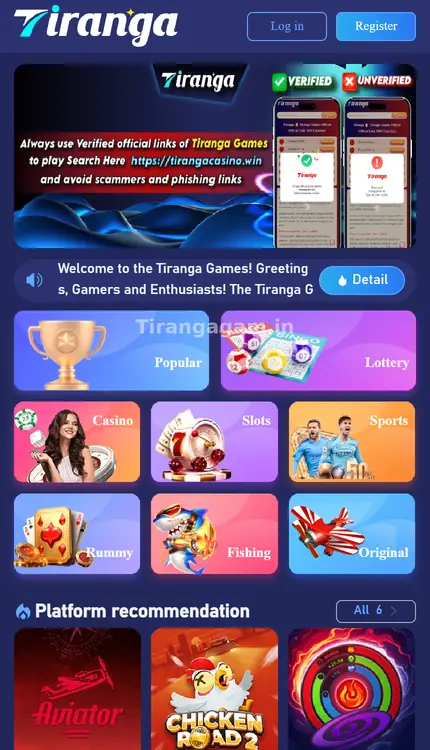
It shows the same home screen as the website: Log in and Register at the top, the Popular, Lottery, Casino, Slots, Sports, Rummy, Fishing and Original tabs, Platform recommendation, and the Home, Activity, Promotion and Account bar at the bottom. Because it is distributed as an install file rather than through Google Play, Android asks for permission to install it. iPhone users use the Add to Desktop shortcut instead.
Android
How do I install the Tiranga app on Android?
Download from inside the platform, allow the install once, then open the app and sign in.
- Open Tiranga in Chrome. Use the Log in button on this site or a bookmark you trust.
- Open the menu. Find Download APP in the menu list.
- Download the file. Let the download finish and tap the notification.
- Allow the install. If Android asks, allow installs from this source for Chrome, then go back.
- Install and open. Tap Install, then Open.
- Log in. Use your usual phone number and password. See Tiranga app login if it fails.
Any phone
How do I add Tiranga to my home screen without an APK?
Use Add to Desktop in the Tiranga menu, or your browser’s Add to Home Screen option, to create an app-like icon.
- Open Tiranga in your browser. Safari on iPhone, Chrome on Android.
- Tap Add to Desktop. Or use Share → Add to Home Screen (iPhone) / ⋮ → Add to Home screen (Android).
- Name the icon. Keep “Tiranga” and confirm.
- Open from the icon. It opens full screen; log in if asked.
Decision helper
Should I use the Tiranga APK or Add to Desktop?
| Feature | Download APP (APK) | Add to Desktop |
|---|---|---|
| Phones | Android only | Android and iPhone |
| Install permission | Needed once | Not needed |
| Storage used | More | Very little |
| Updates | Download the new version from the platform | Always the current web version |
| Risk | Fake APKs if downloaded elsewhere | Low if you added the right site |
Safety
How do I avoid a fake Tiranga APK?
Only download from the Download APP option inside the platform you logged into; anything else can be modified to steal logins or money.
- Ignore APKs sent in WhatsApp or Telegram groups, even from “agents”.
- Avoid “mod”, “hack”, “VIP” or “prediction” versions; they are scams.
- Be suspicious if an app asks for SMS, contacts or accessibility permissions it does not need.
- If you installed an unknown version, uninstall it, change your password and reinstall from the platform.
The Tiranga game online guide covers every other part of the platform.
Fixes
What if the Tiranga app will not install or open?
- “App not installed”: uninstall any older Tiranga app first, free up storage and retry.
- Blocked by Play Protect: this warning appears for many apps outside Google Play; only continue if you downloaded from the platform itself.
- Blank screen: check your connection, then clear the app’s cache in Android settings.
- Cannot sign in: follow Tiranga app login or login problems.
Updates
How do I keep the Tiranga app up to date?
Because the app is not on the Play Store, it does not update itself; you install new versions from the platform.
- Watch for notices. The Announcement section or an in-app message tells you when a new build is out.
- Download from the platform. Use Download APP again while logged in.
- Install over the old app. Your account details are on the server, so nothing is lost.
- Log in and check. Confirm your balance and history match.
If you prefer not to manage updates, the Add to Desktop shortcut always opens the current web version.
FAQ
Tiranga Game app FAQ
Is the Tiranga Game app free?
Yes, downloading and installing costs nothing. Deposits are optional and separate.
Is the Tiranga app on Google Play?
We did not find it there. Use Download APP inside the platform or Add to Desktop.
Can I install the Tiranga app on iPhone?
The APK is for Android. On iPhone, use Add to Desktop or Safari’s Add to Home Screen.
Do I need a new account for the app?
No. Log in with the same phone number or email and password.
How do I update the Tiranga app?
Download the latest file from Download APP inside the platform and install it over the old version.
Why does Android warn me about the Tiranga APK?
Android warns about any app installed outside Google Play. Continue only if the file came from the platform’s own Download APP option.
Summary
Key takeaways
- Get the Android app from Download APP inside Tiranga, not from groups.
- Any phone can use Add to Desktop for an app-like icon.
- One account works in the app, shortcut and browser.
- Uninstall unknown APKs and change your password if you used one.