
Quick answer: how do I withdraw from Tiranga Game?
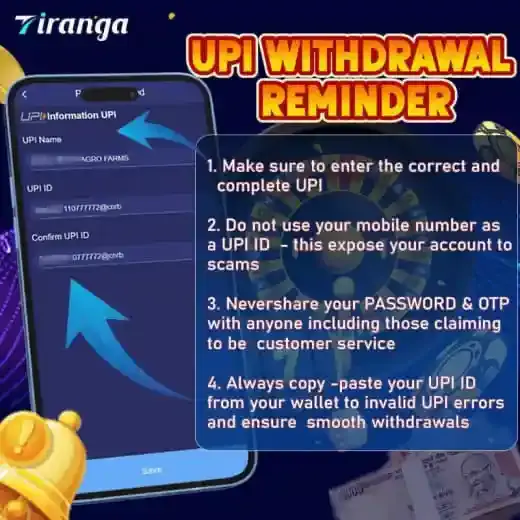
Add a bank account, UPI ID or USDT address in your own name, move any 3rd party balance back to the Main wallet, open Wallet → Withdraw, enter an amount within your withdrawable balance and submit. Track the request in Withdrawal history. The platform’s own UPI reminder says: enter the correct and complete UPI, never use your mobile number as the UPI ID, copy and paste the ID, and never share your password or OTP.
Before you start
What do I need before a Tiranga withdrawal?
You need saved payout details in your name, money in the Main wallet and any reward turnover rules completed.
- Payout method: a bank account with the correct IFSC, a UPI ID, or a USDT address.
- Main wallet balance: tap Main wallet transfer to bring back money from provider games (see the Tiranga wallet guide).
- Withdrawable amount: bonus money often carries betting (turnover) conditions; read the reward rules in the bonus guide.
- Limits: the Withdraw screen shows the current minimum, maximum and any daily count. Check it each time, as limits change.
UPI rules
How do I add a UPI ID for Tiranga withdrawals correctly?
Follow the four points of the platform’s UPI Withdrawal Reminder to avoid failed payouts and scams.
- Enter the correct and complete UPI ID, including the part after the @.
- Do not use your mobile number as the UPI ID; the reminder says it exposes your account to scams.
- Never share your password and OTP with anyone, including people claiming to be customer service.
- Copy and paste your UPI ID from your UPI app to avoid invalid UPI errors.
The UPI information screen has UPI Name, UPI ID and Confirm UPI ID fields. The name should match your bank account holder name.
Step by step
What are the Tiranga Game withdrawal steps?
Once your details are saved, a withdrawal takes a few taps.
- Transfer to Main wallet. Open Wallet and tap Main wallet transfer.
- Tap Withdraw. Choose bank, UPI or USDT.
- Select your saved account. Or add one if this is your first withdrawal.
- Enter the amount. Stay within the withdrawable balance and the limits shown.
- Confirm the request. Enter any password the screen asks for.
- Track it. Open Withdrawal history to see pending, success or failed.
Compare
Which Tiranga withdrawal method should I choose?
| Method | What you save | Common error | Fix option |
|---|---|---|---|
| Bank account | Account holder name, number, IFSC | Wrong IFSC or name mismatch | IFSC Modification, Change bank name, Modify Bank Information |
| UPI | UPI name and UPI ID | Mobile number used as UPI ID | Modify UPI |
| USDT | Wallet address | Wrong network or address | Add USDT Address, Change USDT Address |
All fix options are in the Self Service Center; see Tiranga withdrawal problem for details.
Safety
How do I keep Tiranga withdrawals safe?
- Only use accounts in your own name; third-party accounts are a common reason for rejection.
- Nobody needs your OTP or UPI PIN to send you money.
- Ignore people offering “fast withdrawal” for a fee; that is a scam.
- Withdraw winnings regularly instead of leaving large balances in the wallet.
For everything else, the Tiranga game website guide has the full list of topics.
Turnover explained
What is turnover and how does it affect Tiranga withdrawals?
Turnover (wagering) is the amount you must bet before certain funds, usually bonuses, become withdrawable.
For example, if a reward’s rules say its bonus needs a set multiple of turnover, you must place bets totalling that amount before the bonus or its winnings can be withdrawn. Deposits may also have a basic betting requirement. The exact rules are in each reward’s Game Rules and on the Withdraw screen. If the withdrawable amount looks lower than your balance, unmet turnover is the most likely reason. Check it before you request a payout to avoid a rejection.
FAQ
Tiranga Game withdrawal FAQ
How long does a Tiranga withdrawal take?
It depends on review and the payment channel. Track it in Withdrawal history and use Withdrawal problem in the Self Service Center if it seems stuck.
What is the minimum withdrawal on Tiranga?
The Withdraw screen shows the current minimum and maximum. Limits can change, so check before each request.
Can I use my mobile number as a UPI ID?
The platform’s own reminder says not to, because it exposes your account to scams. Use your full UPI ID.
Why can’t I withdraw my bonus?
Bonus money usually has turnover rules. Read the reward’s Game Rules to see what is required.
Can I withdraw to someone else’s bank account?
Use an account in your own name. Third-party accounts often cause rejected withdrawals.
Can I withdraw in USDT?
The Self Service Center has Add and Change USDT Address options, so USDT payouts are supported. Double-check the network and address.
Summary
Key takeaways
- Save bank, UPI or USDT details in your own name.
- Never use your mobile number as a UPI ID; copy-paste the ID.
- Transfer 3rd party balances to Main wallet first.
- Check limits and bonus turnover rules before requesting.
- Track every request in Withdrawal history.