
Quick answer: how do I contact Tiranga customer service?
Log in, open 24/7 Customer service from the menu to reach the Self Service Center, pick the option that matches your problem, submit the form and check the result with Progress Query after about 15 minutes. For anything the list does not cover, use Online service at the bottom of the list. Real support never asks for your OTP, UPI PIN or password.
Definition
What is the Tiranga Self Service Center?
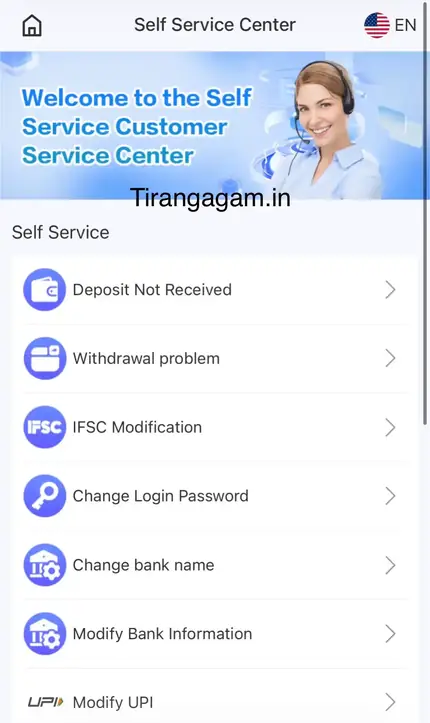
The Self Service Center is Tiranga’s ticket system: a list of common requests, each opening a short form that goes to a customer service specialist for review.
Its kind tips explain the process: select the matching question and submit it for review; after successful submission a specialist handles it “within 10 minutes”; and 15 minutes after submitting you can use Progress Query to view the review result. Using the right option routes your request to the right team, which is faster than general chat.
Options
Which Self Service option should I choose?
| Option | Use it when | Our guide |
|---|---|---|
| Deposit Not Received | Money left your bank but the wallet did not update | Deposit not received |
| Withdrawal problem | A payout is stuck, failed or rejected | Withdrawal problem |
| IFSC Modification | Your saved IFSC is wrong | Withdrawal |
| Change Login Password | You want a new password | Forgot password |
| Change bank name | The account holder name is wrong | Withdrawal |
| Modify Bank Information | Account number or bank changed | Withdrawal |
| Modify UPI | Your UPI ID changed or is wrong | Withdrawal |
| Add / Change USDT Address | Setting or updating a USDT payout address | Withdrawal |
| Activity Bonus | A reward was not credited as expected | Bonus |
| Online service | Anything else | Live chat inside the app |
The list also includes a Tiranga channel link and an option to check the platform’s website address, which help you confirm you are on a genuine link.
Step by step
How do I submit a Tiranga support ticket?
- Log in. Tickets are linked to your account.
- Open the menu. Tap 24/7 Customer service.
- Pick the option. Choose the one that matches your problem exactly.
- Fill in the form. Add order numbers, amounts, UTR and screenshots where asked.
- Submit once. Duplicate tickets slow things down.
- Check Progress Query. After about 15 minutes, read the review result.
Be ready
What information should I have ready for Tiranga support?
- Your registered phone number.
- The order number from Deposit or Withdrawal history.
- The UTR or transaction reference for payments.
- Clear, uncropped screenshots with date and time.
- A one-line description: what you did, what you expected, what happened.
Safety
How do I spot fake Tiranga customer service?
Fake support contacts you first, asks for secrets or money, and works outside the app.
- They message you on WhatsApp, Telegram or Instagram without you asking.
- They ask for your OTP, UPI PIN or password.
- They ask you to pay a fee to release a deposit or withdrawal.
- They send APK files or links to “recover” your account.
Use only the Self Service Center inside your own account. tirangagam.in is an independent guide and cannot access accounts; for questions about this website, see Contact Us. The Tiranga Game support and help overview links every guide.
Response tips
How do I get a faster reply from Tiranga support?
- Pick the most specific option; “Deposit Not Received” routes faster than general chat.
- Submit once and wait for Progress Query rather than re-sending.
- Keep screenshots uncropped with date, time and amount visible.
- Write in short, clear sentences in English or Hindi.
- Stay polite; specialists handle many tickets and clear ones get closed first.
FAQ
Tiranga customer service FAQ
Is Tiranga customer service available 24/7?
The menu labels it 24/7 Customer service. Response times can vary at busy times.
How fast does Tiranga support reply?
The Self Service tips say a specialist handles submissions within about 10 minutes, with Progress Query available after 15 minutes.
Is there a Tiranga customer care phone number?
We did not find a phone line. Support runs through the Self Service Center and Online service inside the app. Be careful with numbers posted online.
Can tirangagam.in fix my Tiranga account?
No. We are an independent guide with no access to accounts or payments. Use the in-app Self Service Center.
What is Progress Query?
A button in the Self Service Center that shows the review result of the work order you submitted.
What if no Self Service option fits?
Use Online service at the bottom of the list to chat with support.
Summary
Key takeaways
- Support runs through the Self Service Center inside your account.
- Pick the matching option, submit once, check Progress Query after 15 minutes.
- Have order numbers, UTR and screenshots ready.
- Real support never asks for OTP, PIN, password or fees.