
Quick answer: how do I fix a Tiranga withdrawal problem?
Open Withdrawal history to see the status, check that your bank name, account number, IFSC or UPI ID are correct and in your own name, confirm any bonus turnover rules are met, then submit Withdrawal problem in the Self Service Center. Use IFSC Modification, Change bank name, Modify Bank Information or Modify UPI to correct details. Never pay anyone to “release” a withdrawal.
Diagnose
What does my Tiranga withdrawal status mean?
The status in Withdrawal history tells you whether to wait, fix details or raise a ticket.
| Status | Meaning | What to do |
|---|---|---|
| Pending / under review | The request is queued or being checked | Wait; raise Withdrawal problem if it stays pending unusually long |
| Success | Sent from the platform | Check your bank or UPI app; bank credit can lag |
| Failed | The bank or UPI rejected the transfer | Fix details, then request again |
| Rejected | Rules or verification not met | Read the reason; check turnover and account name |
Causes
Why is my Tiranga withdrawal failing or stuck?
- Wrong UPI ID: a typo, a missing handle after @, or a mobile number used as the ID.
- IFSC mismatch: the IFSC does not belong to your branch.
- Name mismatch: the bank name saved differs from the account holder name.
- Turnover not met: bonus or deposit amounts still need betting before withdrawal.
- Balance in 3rd party wallet: transfer it back with Main wallet transfer.
- Bank downtime: UPI or bank servers are slow at busy times.
Step by step
How do I report a Tiranga withdrawal problem?
Correct any wrong details first, then raise one clear ticket.
- Check Withdrawal history. Note the order number, amount, time and status.
- Verify your details. Compare saved UPI ID, IFSC and name with your bank app.
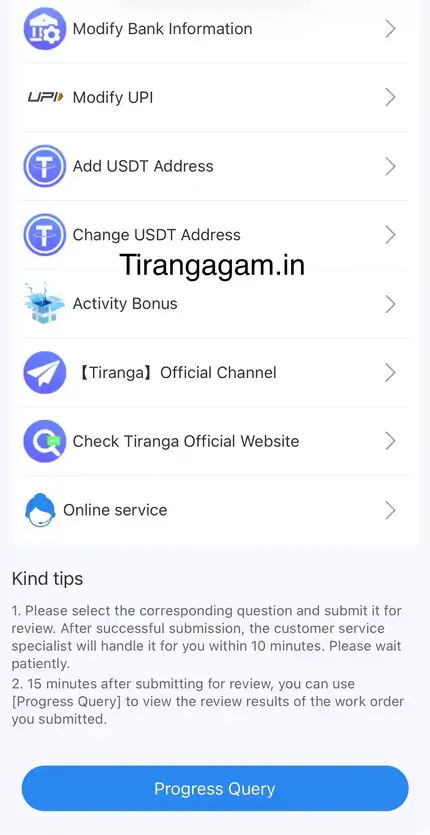
- Fix wrong details. Use IFSC Modification, Change bank name, Modify Bank Information or Modify UPI.
- Open Withdrawal problem. In the Self Service Center.
- Describe the issue. Add the order number and a screenshot of the history entry.
- Follow up. Use Progress Query after about 15 minutes.
Scam alert
Is someone asking me to pay to unlock my Tiranga withdrawal?
Anyone who asks for a “tax”, “unlock fee”, “VIP upgrade” or OTP to release your withdrawal through chat is a scammer.
The platform’s UPI reminder specifically warns never to share your password and OTP with anyone, including people claiming to be customer service. Use only the Self Service Center and Online service inside your own logged-in account. Read our responsible gaming and scam tips.
Prevention
How do I avoid future Tiranga withdrawal problems?
- Copy-paste your UPI ID from your UPI app when saving it.
- Keep bank details in your own name and matching your bank records.
- Read reward rules before accepting a bonus.
- Make one withdrawal at a time and wait for the result.
The standard process is in the Tiranga Game withdrawal guide, and the Tiranga Game homepage covers every other topic.
Timeline
How long should I wait before raising a Tiranga withdrawal ticket?
- Right after requesting: check that the request appears in Withdrawal history as pending.
- If it fails: fix details immediately, since the status tells you the transfer was rejected.
- If it stays pending longer than usual: submit one Withdrawal problem ticket with the order number.
- About 15 minutes after the ticket: check Progress Query for the review result.
- If marked success but not received: allow some hours for the bank, then follow up with a bank statement screenshot.
FAQ
Tiranga withdrawal problem FAQ
Why is my Tiranga withdrawal pending for so long?
It may be under review or waiting on the bank. If it is much longer than usual, submit Withdrawal problem with the order number.
My Tiranga withdrawal shows success but no money arrived.
Bank credits can lag. Check your bank statement after a few hours, then raise a ticket with the history screenshot if it is still missing.
How do I change my bank details on Tiranga?
Use IFSC Modification, Change bank name or Modify Bank Information in the Self Service Center.
How do I change my UPI ID?
Use Modify UPI in the Self Service Center and copy-paste the new ID from your UPI app.
Does a failed withdrawal return to my wallet?
Normally yes. If it has not returned, include it in your Withdrawal problem ticket.
Why was my withdrawal rejected?
Common reasons are unmet turnover, a name mismatch or wrong details. Check the reason shown and the reward rules.
Summary
Key takeaways
- Start with the status in Withdrawal history.
- Most failures are wrong UPI, IFSC or name details.
- Fix details with the matching Self Service option, then raise Withdrawal problem.
- Never pay an “unlock fee” or share your OTP.