
Quick answer: how do I deposit on Tiranga Game?
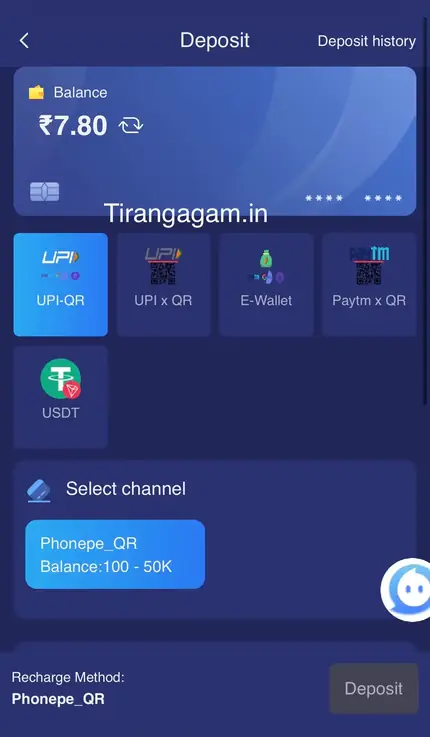
Open Wallet → Deposit, choose a method (UPI-QR, UPI x QR, E-Wallet, Paytm x QR or USDT), pick a channel, select or type an amount within the range shown, then pay exactly that amount in your UPI app or wallet. On the Phonepe_QR channel we checked, the range was ₹100 to ₹50,000. Keep your UTR number until the balance updates, and never cancel after you have paid.
Payment options
Which deposit methods does Tiranga Game accept?
The Deposit screen we captured listed five methods, each with one or more channels that have their own limits.
| Method | How you pay | Notes |
|---|---|---|
| UPI-QR | Scan a QR with a UPI app | Channel example: Phonepe_QR ₹100–₹50K |
| UPI x QR | UPI payment via QR | Check the channel’s own range |
| E-Wallet | Supported e-wallet | Follow the on-screen wallet steps |
| Paytm x QR | Scan with Paytm | Pay the exact amount shown |
| USDT | Crypto transfer | Use the exact network and address shown |
A Fast Deposit banner in the app also promoted ARBPAY, WINPLAY and USDT options. Methods and channels change, so use what the Deposit screen shows on the day.
Step by step
What are the Tiranga Game deposit steps?
A UPI deposit takes about a minute if you follow these steps in order.
- Log in and open Wallet. Tap Deposit.
- Select a method. For example UPI-QR.
- Choose a channel. Note its minimum and maximum.
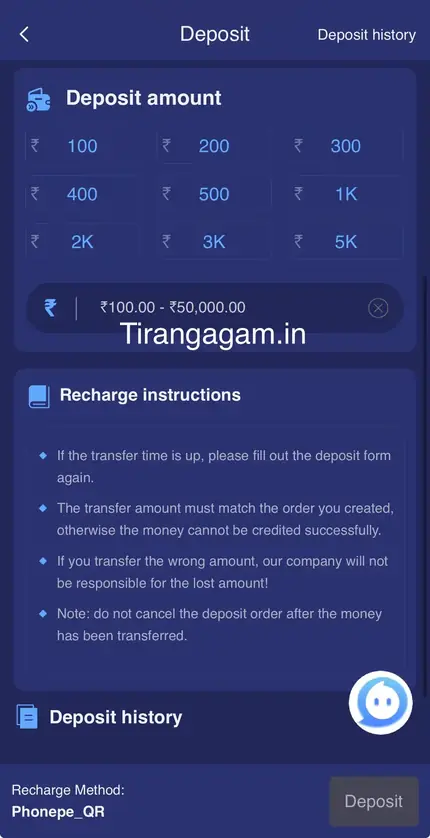
- Pick an amount. Tap a preset (₹100, ₹200, ₹300, ₹400, ₹500, ₹1K, ₹2K, ₹3K or ₹5K) or type one in range.
- Tap Deposit. A payment page with a QR or UPI details opens with a timer.
- Pay the exact amount. Use your own UPI app; do not edit the amount.
- Wait on the page. Do not press back or cancel after paying.
- Check Deposit history. Save the UTR/reference until the balance updates.
Rules
What do the Tiranga recharge instructions say?
The recharge instructions under the amount buttons set four rules that prevent most deposit problems.
- The transfer amount must match the order you created, otherwise the money cannot be credited automatically.
- If you transfer the wrong amount, the instructions warn the platform will not be responsible for the lost amount.
- Do not cancel the deposit order after the money has been transferred.
- If the transfer time is up before you pay, fill out the deposit form again to create a new order. If you already paid, use Deposit Not Received instead of paying twice.
Good habits
How do I deposit on Tiranga safely?
- Set a weekly deposit limit before you start and do not top up to chase losses.
- Pay only through the payment page opened from your own Wallet, never to a UPI ID someone sends you in chat.
- Screenshot the payment success screen showing the UTR number.
- Start with the minimum on a new channel to check it works.
- Read reward rules such as the First Deposit Bonus in the Tiranga bonus guide before deciding how much to add.
For how deposits fit with games and withdrawals, see the Tiranga Game India guide.
Problems
What if my Tiranga deposit is not credited?
Do not pay again. Check Deposit history, then submit Deposit Not Received in the Self Service Center with your UTR and screenshot.
The full process, including what to write and when to use Progress Query, is in Tiranga deposit not received. The Main wallet and history screens are explained in the Tiranga wallet guide.
Common mistakes
What mistakes cause Tiranga deposit problems?
- Typing a rounded amount in the UPI app instead of the exact order amount.
- Pressing back or cancelling while the payment is processing.
- Paying after the order timer has expired.
- Scanning an old QR saved from a previous deposit; each order has its own.
- Paying a UPI ID someone sent in a chat instead of the one on your own order page.
Each of these breaks the automatic match between your payment and your order. Avoid them and most deposits credit without any ticket.
FAQ
Tiranga Game deposit FAQ
What is the minimum deposit on Tiranga Game?
On the Phonepe_QR channel we checked it was ₹100, with a maximum of ₹50,000. Each channel shows its own range.
Can I deposit on Tiranga with Paytm or PhonePe?
The methods included Paytm x QR and UPI-QR channels such as Phonepe_QR, which you pay with a UPI app.
Does Tiranga accept USDT deposits?
USDT was listed as a method. Use the exact network and address shown and double-check before sending.
How long does a Tiranga deposit take?
UPI deposits usually update quickly once matched. If it stays pending, follow the deposit not received steps.
Can I pay a different amount than the order?
No. The recharge instructions say the amount must match the order, or crediting can fail.
Is there a bonus on my first Tiranga deposit?
The Activity page showed a First Deposit Bonus banner. Terms and amounts change, so read its rules in the app first.
Summary
Key takeaways
- Deposit from Wallet → Deposit using UPI-QR, UPI x QR, E-Wallet, Paytm x QR or USDT.
- Each channel has its own range; we saw ₹100–₹50,000.
- Pay the exact amount, do not cancel after paying, keep the UTR.
- If it is not credited, do not pay again; use Deposit Not Received.