
Quick answer: how do I register on Tiranga Game?
Open the Tiranga register screen, enter your +91 mobile number, tap Send and type the verification code, set and confirm a password, check that the invite code shows 4226313106120, tick the Privacy Agreement and tap Register. You must be 18 or older, and you should check that real-money gaming is allowed in your state before you sign up.
Before you start
What do I need to create a Tiranga Game account?
You need an Indian mobile number that can receive SMS, a new password, an invite code and a few minutes.
- A +91 mobile number in your own name. It becomes your login ID.
- SMS access on that number for the verification code.
- A password you do not use for email, UPI or banking.
- An invite code. Ours is 4226313106120 and fills in automatically from our Register button. See the Tiranga invite code guide.
- Age 18+ and a state where online real-money games are permitted.
Step by step
What are the Tiranga Game register steps?
Registration is one form with six fields and a checkbox.
- Open the register screen. Tap Register on this site; the form opens with the invite code filled in.
- Enter your phone number. Keep +91 and type your 10-digit number.
- Request the code. Tap Send next to Verification Code and wait for the SMS.
- Type the verification code. Enter it exactly as received, before it expires.
- Set your password. Type it in Set password, then again in Confirm password.
- Check the invite code. It should read 4226313106120.
- Agree and register. Tick “I have read and agree 【Privacy Agreement】” and tap Register.
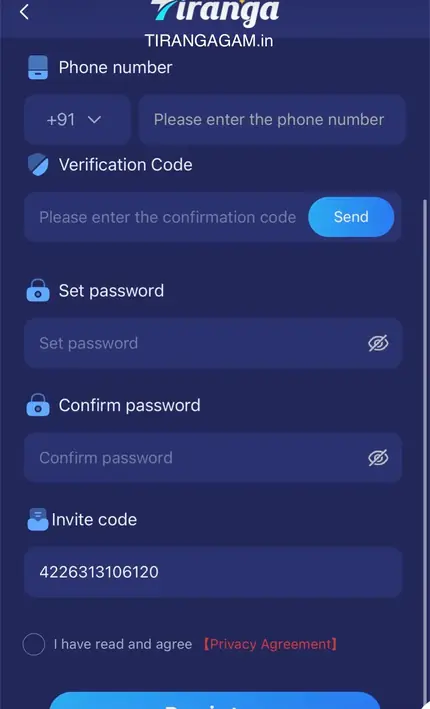
Form guide
What does each field on the Tiranga register form mean?
| Field | What to enter | Common mistake |
|---|---|---|
| Phone number | Your 10-digit +91 mobile number | Adding a 0 or typing +91 twice |
| Verification Code | The SMS code after tapping Send | Using an old code or waiting too long |
| Set password | A new, unique password | Reusing your UPI or email password |
| Confirm password | The same password again | A typo that does not match |
| Invite code | 4226313106120 | Leaving it blank or mistyping digits |
| Privacy Agreement | Tick after reading it | Not ticking, so Register stays inactive |
Fixes
Why am I not getting the Tiranga verification code?
A missing SMS usually means network delay, a DND or spam filter, a full inbox or a mistyped number.
- Check the number on screen, then wait a minute before tapping Send again.
- Look in your SMS spam or promotions folder.
- Restart the phone or toggle airplane mode to refresh the network.
- Make sure the SIM is active and has signal; dual-SIM phones should use the right slot.
- If the number is already registered, go to Tiranga Game login instead.
Next steps
What should I do after registering on Tiranga?
After sign-up, log in, set a budget, add withdrawal details carefully and read reward rules before your first deposit.
- Log in with your phone number and new password.
- Set a limit for how much you will deposit this week and stick to it.
- Install the app or add the shortcut with the Tiranga Game app guide.
- Understand the wallet using our Tiranga wallet explainer.
- Read the rules of the First Deposit Bonus and other offers in the bonus guide before you rely on them.
- Make a small first deposit following the deposit steps.
For the whole journey in one place, open the TirangaGame beginners guide.
Account security
How do I secure a new Tiranga account from day one?
Security is easiest to set up right after registration, before any money is in the wallet.
Use a password that exists only for Tiranga and store it in a password manager. Add withdrawal details in your own name, copying the UPI ID from your UPI app instead of typing it, and never use your mobile number as the UPI ID, as the platform itself warns. Save the login page as a bookmark or install the app through Download APP so you never search for the site again. Finally, decide a monthly spending limit and write it down; it is much easier to keep to a number you chose before your first round than one you invent mid-game.
FAQ
Tiranga Game register FAQ
Is Tiranga Game registration free?
Yes, creating the account costs nothing. You only spend money if you choose to deposit.
Can I register on Tiranga with email?
The form we checked registers with a +91 phone number and SMS code. An Email Login tab exists on the login screen for accounts that have an email.
What is the invite code for Tiranga registration?
Use 4226313106120. It links your account to our invitation and is filled in automatically from our Register button.
Can I open two Tiranga accounts?
Keep to one account per person. Multiple accounts can be restricted and make support and withdrawals harder.
Why is the Register button not working?
Usually the Privacy Agreement box is not ticked, the passwords do not match or the verification code is wrong or expired.
How old do I need to be to register?
18 or older. The platform states it only accepts customers above the age of 18.
Summary
Key takeaways
- Register with a +91 number, SMS code and a unique password typed twice.
- Invite code 4226313106120 fills in from our Register button.
- Tick the Privacy Agreement or the form will not submit.
- Set a budget and read bonus rules before your first deposit.
- One account per person, adults 18+ only.