
Quick answer: what do I do if I forgot my Tiranga password?
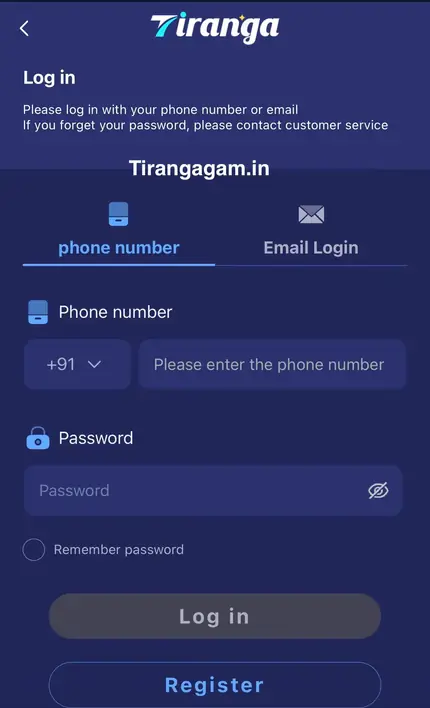
On the Tiranga login screen, tap Forgot password?. The screen advises that if you forget your password you should contact customer service, who verify your account and help you set a new one. If you are still logged in somewhere, it is faster to use Change Login Password in the Self Service Center. Never give your password or OTP to anyone who contacts you first.
Options
What are the ways to reset a Tiranga password?
There are two routes: recover it from the login screen when you are locked out, or change it in the Self Service Center when you are still signed in.
| Situation | Route | What you need |
|---|---|---|
| Locked out, forgot password | Login screen → Forgot password? → customer service | Registered phone number and account checks |
| Logged in, want a new password | Self Service Center → Change Login Password | Access to your account and registered number |
| Think someone else changed it | Customer service via Online service | Registration details and recent deposit info |
Locked out
How do I recover a forgotten Tiranga password?
Start from the login screen and let customer service verify that the account is yours.
- Open the login screen. Tap Log in on this site or open your app.
- Tap Forgot password?. It sits under the Remember password box.
- Follow the instructions. The screen points you to customer service for help.
- Verify your account. Give your registered +91 number and answer the checks asked.
- Set a new password. Choose one you have never used elsewhere.
- Log in again. Sign in with the new password and update any saved password.
Logged in
How do I change my Tiranga login password in the Self Service Center?
Open the Self Service Center, choose Change Login Password, fill in the form and submit it; then check its status with Progress Query.
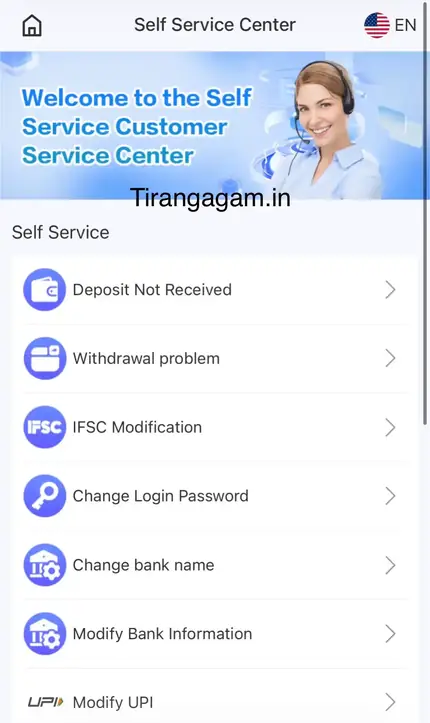
- Open the menu. Go to 24/7 Customer service or the Self Service Center.
- Tap Change Login Password. It is listed with the deposit and bank options.
- Complete the form. Enter the details it asks for exactly as registered.
- Submit and wait. The tips said requests are handled within about 10 minutes.
- Check Progress Query. Look again after about 15 minutes if nothing has changed.
Security
What makes a strong Tiranga password?
- At least 8 characters with a mix of letters and numbers.
- Not your phone number, name, birth date or “123456”.
- Not the same as your email, UPI app or bank password.
- Stored in a password manager rather than a screenshot in your gallery.
Nobody from Tiranga needs your password, SMS code or UPI PIN. If a “support agent” asks for them on WhatsApp or Telegram, it is a scam.
Fixes
What if the Tiranga password reset does not work?
If the reset fails, check you are using the registered number, wait for the request to finish and follow up through Progress Query or Online service.
- Wrong number: the reset must be for the number the account was created with.
- Still processing: give the request 15 minutes before resubmitting to avoid duplicates.
- Lost SIM: tell customer service you no longer have the number; they may ask for extra proof.
- Still failing: see Tiranga login problems and the customer service guide.
Once you are back in, return to the tiranga game account guide for wallet, deposit and withdrawal help.
Common mistakes
What mistakes slow down a Tiranga password reset?
- Submitting several Change Login Password requests at once, which creates duplicates for support to untangle.
- Giving a different phone number from the one on the account.
- Asking for help in public groups, where scammers watch for people locked out of accounts.
- Reusing the old password or a simple pattern, which leads straight back to the same problem.
After a successful reset, log out on other devices, update your saved password and check Deposit and Withdrawal history for anything you do not recognise.
FAQ
Tiranga forgot password FAQ
Can I reset my Tiranga password without customer service?
If you are logged in, use Change Login Password in the Self Service Center. If you are locked out, the login screen directs you to customer service.
Will resetting my password affect my Tiranga balance?
No. Your wallet, history and rewards stay the same; only the password changes.
How long does a Tiranga password change take?
The Self Service tips said about 10 minutes after submission, with Progress Query suggested after 15 minutes.
Is the withdrawal password the same as the login password?
If your account uses a separate withdrawal or fund password, treat it separately and keep it different from your login password.
Someone changed my Tiranga password. What now?
Contact customer service through Online service at once, explain the situation and do not deposit until the account is secure again.
Should I create a new account instead?
No. A new account will not have your balance and duplicate accounts can be restricted. Recover the original one.
Summary
Key takeaways
- Locked out: Forgot password? on the login screen, then customer service.
- Logged in: Self Service Center → Change Login Password.
- Allow about 10–15 minutes, then check Progress Query.
- Use a unique password and never share it or your OTP.