
Quick answer: how do I log in to the Tiranga app?
Open the Tiranga app or your Add to Desktop icon, tap Log in, enter the same +91 phone number (or email) and password you use on the website, and tap Log in. The app does not use a separate account. If you have not installed it yet, follow the Tiranga Game app install guide first.
Basics
What is Tiranga app login?
Tiranga app login is signing in to your Tiranga account from the downloaded Android app or the home-screen shortcut instead of a browser tab.
The platform offers two ways to keep it on your phone. Download APP gives Android users an installable app file from inside the platform. Add to Desktop pins the web version to your home screen on Android or iPhone, so it opens full screen like an app. Both show the same login screen, the same phone number and Email Login tabs and the same wallet as the website.
Step by step
How do I sign in on the Tiranga Android app?
Open the app, tap Log in, fill in your number and password and press Log in; it takes under a minute.
- Open the app. Tap the Tiranga icon on your home screen or app drawer.
- Tap Log in. It sits at the top right of the home screen next to Register.
- Choose the tab. Phone number (+91 preselected) or Email Login.
- Enter your password. Tick Remember password only if the phone is yours alone.
- Tap Log in. The lobby loads with your balance at the top.
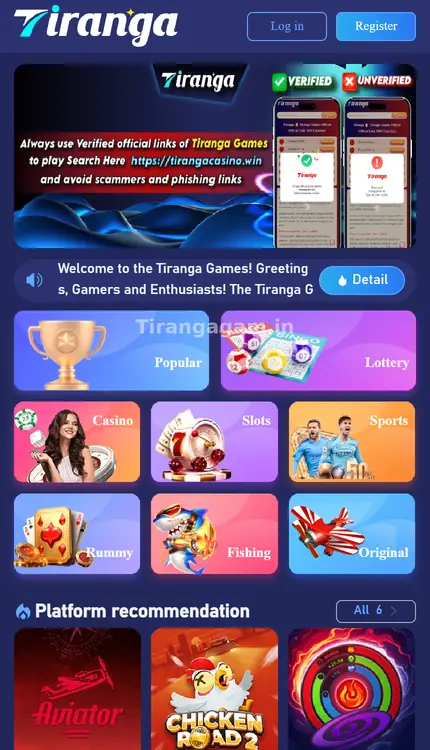
Home screen
How do I log in through the Add to Desktop shortcut?
Log in once in your browser, add the shortcut from the menu, then open the icon; it keeps the browser session and asks you to sign in only if the session ends.
- Open Tiranga in your browser. Use a link you trust and log in.
- Open the menu. Tap Add to Desktop (on iPhone you can also use Share → Add to Home Screen).
- Confirm the icon. Name it Tiranga and add it.
- Open the icon. If you see the login screen, enter your number and password again.
Compare
Should I log in with the app, the shortcut or the browser?
All three reach the same account; pick the one that suits your phone and how often you play.
| Option | Works on | Good for | Watch out for |
|---|---|---|---|
| Download APP | Android | Full-screen app with its own icon | Install only from inside the platform |
| Add to Desktop | Android and iPhone | No install file, quick icon | Clearing browser data logs you out |
| Browser tab | Any device | Occasional use, shared devices | Bookmark the right address |
Fixes
Why can’t I log in to the Tiranga app?
App-only login failures are usually caused by an outdated app, blocked storage, a battery saver closing the app, or an APK from an unknown source.
- Update the app: download the latest version through Download APP inside the platform, then sign in again.
- Allow storage and background data: in Android settings, make sure the app is not restricted.
- Try the browser: if the browser works but the app does not, the problem is the app build, not your account.
- Remove unknown APKs: uninstall any Tiranga app you got from a group or forward and install fresh from the platform.
For password and token errors that happen everywhere, see Tiranga login problems; to reset a password, see Tiranga forgot password.
Security
How do I keep the Tiranga app login secure?
- Lock your phone with a PIN or fingerprint, since the app may stay signed in.
- Do not tick Remember password on shared phones.
- Never install “mod”, “hack” or “prediction” versions of the app.
- Log out and uninstall before you sell or give away your phone.
For a full picture of the platform, the Tiranga Game app and platform guide links every topic in one place.
Permissions
Which permissions does the Tiranga app need to log in?
A gaming app needs internet access and, at most, storage or notifications; it does not need your SMS inbox, contacts or accessibility controls.
During installation Android shows the permissions the file requests. If a Tiranga APK asks to read SMS, access contacts, draw over other apps or use accessibility services, do not install it: those permissions let malware read OTPs and control your phone. A genuine install from the platform should sign in with only your number and password. On iPhone, the Add to Desktop shortcut uses Safari and asks for no special permissions at all.
FAQ
Tiranga app login FAQ
Do I need a new account for the Tiranga app?
No. Use the same phone number or email and password as on the website; the balance and history are shared.
Is the Tiranga app on the Play Store?
We did not find it there. Use the Download APP option inside the platform or the Add to Desktop shortcut.
Why does the Tiranga app keep logging me out?
A battery saver, cleared app data or a session ending on another device can log you out. Allow background activity and sign in again.
Can I use the Tiranga app on iPhone?
The Android APK does not install on iPhone. Use Add to Desktop or Share → Add to Home Screen in Safari.
Is “tiranga app login” different from website login?
No. It is the same account and the same login screen, just opened from the app icon.
What if my app shows an update message?
Update only through the platform’s Download APP option. Ignore update links that arrive by message.
Summary
Key takeaways
- The app, shortcut and browser all use one Tiranga account.
- Android users can install through Download APP; any phone can use Add to Desktop.
- App-only errors are usually fixed by updating or reinstalling from the platform.
- Never install modified or “prediction” apps.